Short answer: At the end of December 2026, Microsoft will turn off Basic Authentication for SMTP AUTH by default in Exchange Online. Copiers and multifunction printers that send scan to email through Microsoft 365 with a saved username and password will stop sending. Toner alerts and service notices sent the same way are affected too. The fix is to turn on OAuth (modern sign-in) on the device, route its mail through an SMTP relay, or scan to a cloud destination instead of email.
For most organizations, the list of affected devices is longer than it looks. This guide explains what Microsoft is changing, how to tell whether your copiers are affected, and the three practical ways to keep them sending after the deadline.
What is Microsoft changing?
Basic Authentication is the original way a device proves who it is to a mail server: it sends a username and password. Microsoft has been retiring it across Microsoft 365 since 2022 because those credentials are easy to steal and reuse. SMTP AUTH client submission, the protocol a copier uses to hand a scanned PDF to Microsoft 365 for delivery, is the last piece.
Once Basic Authentication is off, devices and applications can still use SMTP AUTH, but they must sign in with OAuth (modern authentication) instead of a stored password.
When does Basic Authentication for SMTP AUTH turn off?
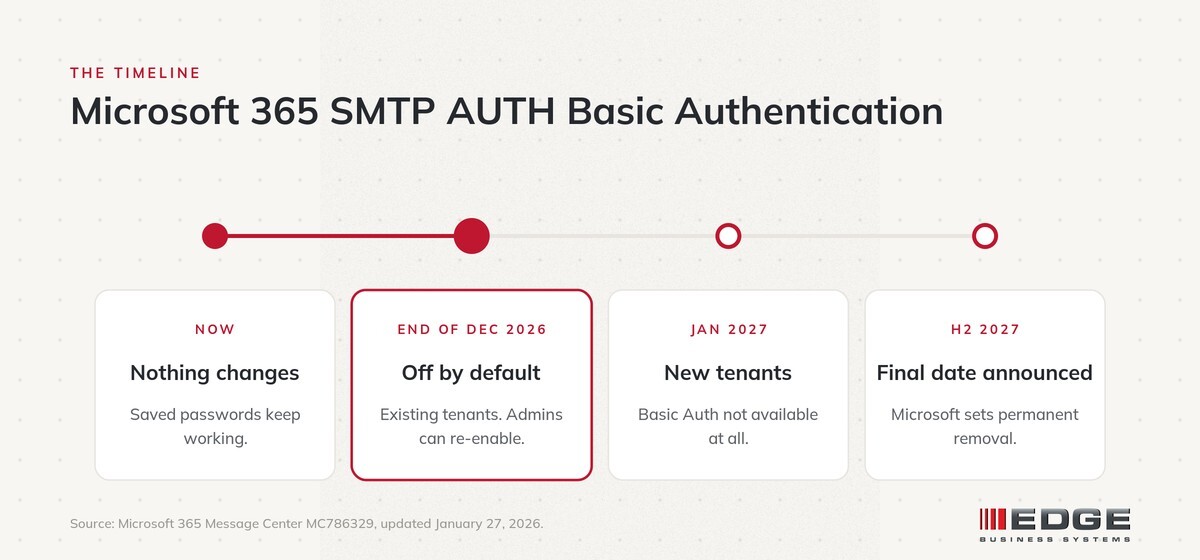
Microsoft updated the timeline on January 27, 2026:
| When | What happens |
|---|---|
| Now through December 2026 | No change. Devices using a saved password keep working. |
| End of December 2026 | Basic Authentication for SMTP AUTH is disabled by default for existing Microsoft 365 tenants. Administrators can turn it back on temporarily. |
| New tenants after December 2026 | Basic Authentication for SMTP AUTH is not available. OAuth is the supported method. |
| Second half of 2027 | Microsoft announces the final date it is removed for good. |
Microsoft has moved this date before. The earlier plan called for a cutoff between March and April 2026, and it slipped only because many customers were not ready. We would not plan around another extension.
Which devices are affected?
Any device or application that sends email through a Microsoft 365 mailbox using SMTP AUTH and a saved username and password. In a typical office that includes:
- Copiers and multifunction printers that scan to email
- Standalone scanners that email documents
- Low toner and supply alerts sent to your dealer or IT team
- Service and error notifications from devices
- Line of business applications that email reports, invoices or statements
Printing and copying are not affected. Devices that already use OAuth, send through a relay, or scan to a folder or cloud destination are not affected either.
What does it look like when a copier is affected?
There is no warning. The first sign is usually a user scanning a document to email and getting a "send failed" message with no explanation. The copier and the network are both working. The Microsoft 365 mailbox the copier signs in to simply no longer accepts its saved password. Supply alerts stop arriving at the same time, which can go unnoticed until a device runs out of toner.
How do I check whether my copiers are affected?
- Run the SMTP AUTH report. In the Exchange admin center, the SMTP AUTH Clients Submission report lists every client that has sent mail through SMTP AUTH and shows the authentication protocol each one used. Anything listed with Basic Authentication will be affected.
- Check each device. Open the scan to email settings on each copier and look at how it signs in. A saved Microsoft 365 username and password means it needs attention.
- List your applications. Ask which software sends email on its own, such as accounting, scheduling or monitoring tools, and how each one authenticates.
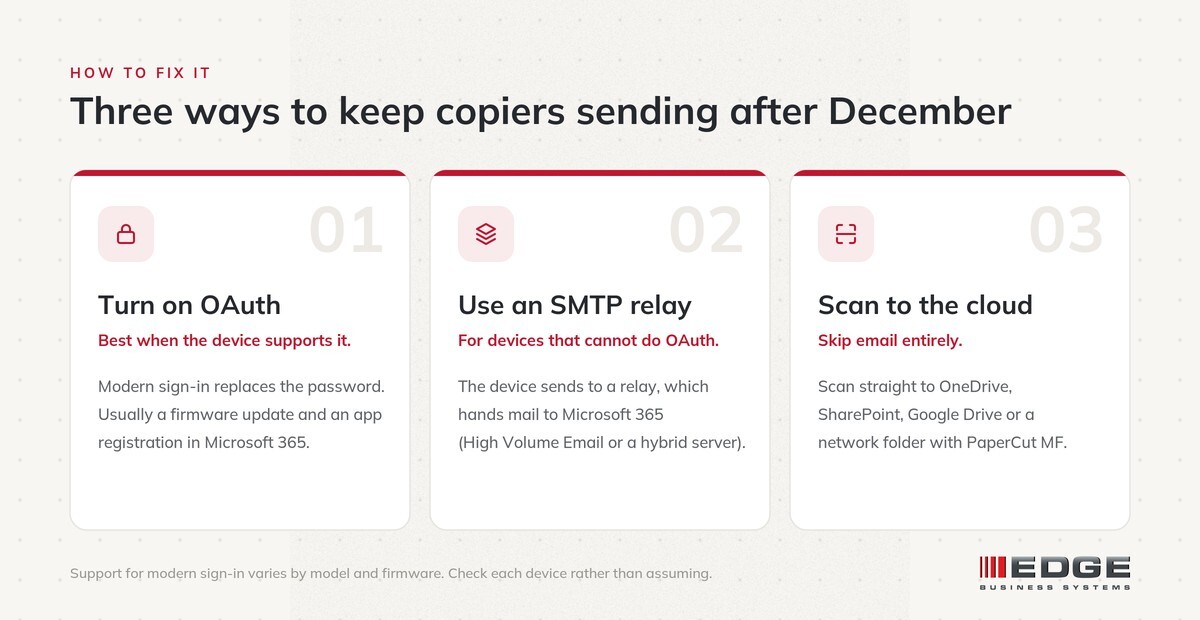
How do I fix it? Three options
| Option | Best for | What it involves |
|---|---|---|
| Turn on OAuth | Newer copiers that support modern sign-in | Usually a firmware update, an app registration in Microsoft 365 and a reconfiguration of the device |
| Use an SMTP relay | Devices that cannot use OAuth | The device sends to a relay, which hands mail to Microsoft 365. Options include Microsoft 365 High Volume Email for internal mail, an on-premises Exchange server in a hybrid setup, or a third-party relay service |
| Scan to the cloud | Organizations ready to stop emailing scans | Users scan straight to OneDrive, SharePoint, Google Drive or a network folder with print management software such as PaperCut MF, so no mailbox is involved |
Option 1: Turn on OAuth on the device
This is the cleanest fix when the copier supports it. Support varies by manufacturer, model and firmware version, so it should be confirmed for each device in your fleet rather than assumed.
Option 2: Route mail through an SMTP relay
If a device cannot use OAuth, it can keep sending email through a relay instead of signing in to Microsoft 365 directly. Users see no difference at the device.
Option 3: Scan to the cloud instead of email
This is the option most organizations overlook. A scan does not have to travel as an email attachment. With a print management platform such as PaperCut MF, users sign in at the copier and scan directly to the folder where the document belongs, and the Microsoft 365 change no longer applies to that device. If you have been considering cloud scanning anyway, this deadline is a good reason to move.
Can my IT team just turn Basic Authentication back on?
For a while. Microsoft has said administrators can re-enable it after the December change. That buys time, but it keeps a weaker sign-in method active on your tenant, and Microsoft will remove it for good on a date it announces in the second half of 2027. Treat it as a short bridge, not a plan.
Is this the same as Windows Protected Print?
No. Windows Protected Print is a separate Microsoft change that affects how Windows PCs print and which drivers they use. The SMTP AUTH change affects how devices send email. Both are worth planning for, but they call for different fixes.
How EDGE helps
EDGE Business Systems is an independent office technology partner in Roswell, Georgia, serving metro Atlanta and the Athens area. Our in-house technicians work on Canon and Xerox devices every day, so we know which models support modern sign-in and which need a relay or a different scanning setup. For EDGE clients, we can confirm how each device sends email, recommend the right path and handle the firmware and configuration, working alongside your IT team or managed service provider.
Related reading: major changes coming to print and scan, a 10-minute security self-audit for your print fleet, and EDGE scanning solutions.
Frequently asked questions
When does Microsoft turn off Basic Authentication for SMTP AUTH?
At the end of December 2026, Basic Authentication for SMTP AUTH is disabled by default for existing Microsoft 365 tenants. Administrators can re-enable it temporarily. Microsoft will announce the final removal date in the second half of 2027.
Will my copier stop scanning to email in January 2027?
If it sends email through Microsoft 365 with a saved username and password, yes. Devices that use OAuth, an SMTP relay, or scan to a folder or cloud destination will keep working.
Will my copier stop printing?
No. Printing and copying are not affected. The change only affects email sent from the device, such as scan to email, toner alerts and service notifications.
How do I know if a device uses Basic Authentication?
The SMTP AUTH Clients Submission report in the Exchange admin center shows each client that sends mail through SMTP AUTH and the authentication protocol it uses. You can also check the scan to email settings on each device for a saved username and password.
What is the best fix for older copiers?
If an older device cannot use OAuth, route its mail through an SMTP relay or switch it to scan to a folder or cloud destination instead of email.
Does this affect Google Workspace?
No. This change applies to Microsoft 365 (Exchange Online). Google Workspace has its own requirements for devices that send mail.
Is this related to Windows Protected Print?
No. Windows Protected Print changes how Windows PCs print. The SMTP AUTH change affects how devices send email.
Get ahead of it before January
Changes like this rarely cause trouble for organizations that plan for them. They cause trouble on the first Monday after the holidays, with a line forming at the copier. If you want to know whether your devices are affected and what it will take to fix them, schedule a 10-minute call with EDGE. No pitch, no pressure.
Sources
- Microsoft Exchange Team: Updated Exchange Online SMTP AUTH Basic Authentication deprecation timeline
- Microsoft 365 Message Center MC786329 (archive)
- Microsoft Learn: Authenticate an IMAP, POP or SMTP connection using OAuth
- Microsoft Learn: High Volume Email for Microsoft 365
- Office 365 for IT Pros: SMTP AUTH client submission retirement delayed
EDGE Business Systems: Measure. Simplify. Manage. Secure.
Topics: