Best Document Scanning and Workflow Automation Services for Businesses (2026 Guide)
4 min read
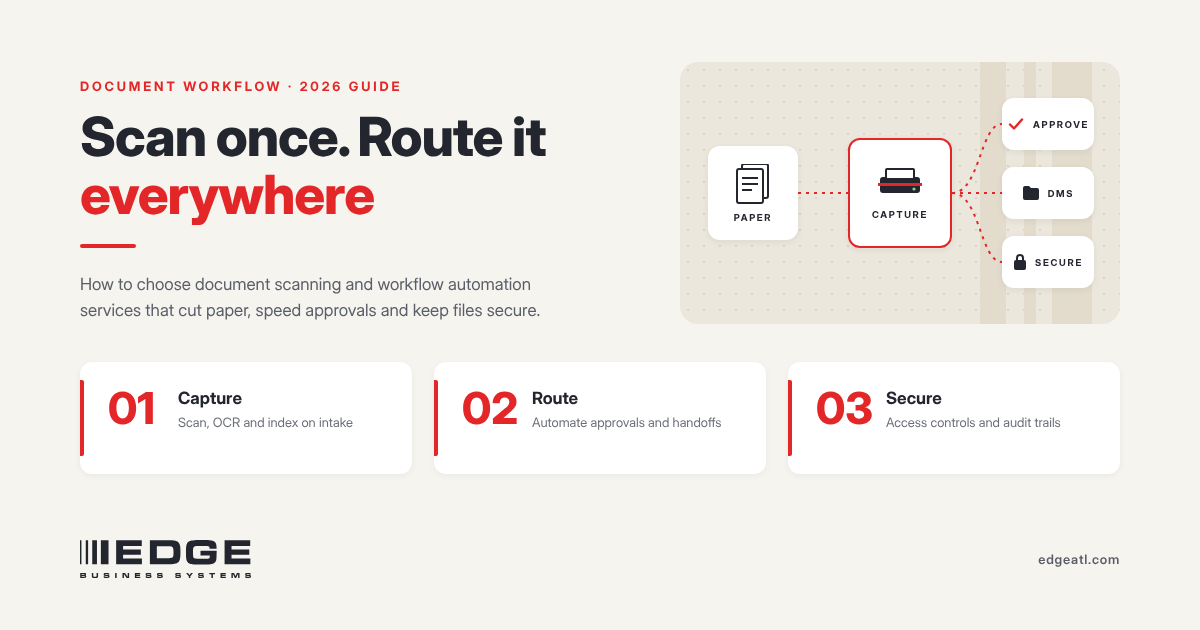
Short answer: The best document scanning and workflow automation service is one that handles both sides of the problem: converting the paper you already have and automating how new documents are captured, routed, stored, and retained from now on. Look for a provider that can scan and index your records accurately, set up your multifunction printers to scan straight into the right systems, secure the documents end to end, and support the setup after go-live. For most small and mid-sized businesses, that means working with one accountable local provider rather than stitching together a scanning bureau, a software vendor, and an IT contractor.
Last updated: November 18, 2026.
Paper-heavy processes cost more than storage space. They slow approvals, make audits painful, and leave sensitive records in filing cabinets and inboxes where they are hard to protect. This guide explains what document scanning and workflow automation services include, the types of providers you will find, what to require, and how to decide between scanning in-house and outsourcing.
Key takeaways
- Separate the two jobs: backfile scanning (old paper) and day-forward capture (new documents).
- Require OCR, consistent indexing, and direct routing to your document management, ERP, accounting, or EHR system.
- Security and retention rules should be designed in, not added later.
- Your existing multifunction printers can often do most day-forward capture once they are configured correctly.
- Choose a provider that will own the setup after go-live, not just deliver files.
What do document scanning and workflow automation services include?
| Service | What it does |
|---|---|
| Backfile conversion | Scans existing paper records in bulk, often boxes or file rooms, into searchable digital files. |
| Day-forward capture | Digitizes new documents as they arrive, usually at multifunction printers or desktop scanners. |
| OCR and indexing | Makes scans text-searchable and tags them with fields like customer, invoice number, or date. |
| Routing and workflow | Sends each document to the right folder, system, or approver automatically. |
| Document management | Stores files with permissions, version control, search, and audit trails. |
| Retention and destruction | Keeps records as long as required, then disposes of them on schedule. |
| Security and access control | Controls who can scan, view, and share documents, and logs activity. |
What types of providers offer these services?
- Scanning bureaus. Strong at one-time backfile conversion. They usually do not configure your office devices or support day-forward workflows.
- Software vendors. Sell document management or capture software. Implementation and device setup are often left to you or a partner.
- IT managed service providers. Can integrate systems but may not specialize in high-volume capture or multifunction printer configuration.
- Office technology providers. Combine multifunction printers, scanning, capture software, document management, and service under one contract, which suits businesses that want one accountable team.
The right fit depends on whether your project is mostly a one-time cleanup, mostly ongoing capture, or both. Most businesses need both.
What should you require from a scanning and workflow provider?
- A discovery process. They should map which documents you handle, where they come from, who needs them, and how long you must keep them before recommending anything.
- Accurate OCR and indexing. Ask how they check quality and what happens when a field is misread.
- Integration with your systems. Scans should land in your document management, accounting, ERP, practice management, or EHR system, not in a shared inbox.
- Device configuration. Your multifunction printers should have one-touch scan workflows, preset destinations, and user login.
- Security by design. Encryption in transit and at rest, role-based access, audit logs, and controlled scan destinations.
- Retention planning. Rules for how long each record type is kept and how it is disposed of.
- Chain of custody for backfile work. Documented handling of boxes and originals, and an agreed plan for paper after scanning.
- Ongoing support. A named contact, training for staff, and someone accountable when a workflow breaks.
Should you scan documents in-house or outsource?
| In-house | Outsourced | |
|---|---|---|
| Best for | Day-forward documents and steady daily volume | Large one-time backlogs and fragile or unusual originals |
| Speed to start | Fast if your devices are configured | Depends on pickup and processing schedules |
| Control | Documents never leave your office | Requires a documented chain of custody |
| Staff time | Uses employee time | Frees staff from bulk scanning |
Many businesses do both: outsource or batch the backlog once, then capture new documents in-house at their multifunction printers so the paper problem does not come back.
Which processes should you automate first?
- Accounts payable: invoices scanned, indexed by vendor and amount, and routed for approval.
- HR and onboarding: employee forms filed to the right personnel record with restricted access.
- Contracts and agreements: signed copies stored with searchable terms and renewal dates.
- Customer or patient intake: forms captured at the front desk and filed to the right account.
- Compliance records: documents kept on a defined retention schedule with an audit trail.
Start with the process where people spend the most time searching for, re-keying, or chasing paper.
How do you measure whether workflow automation is working?
- Time to find a document, before and after.
- Days to approve an invoice or complete onboarding.
- Reduction in printing, copying, and physical storage.
- Number of documents scanned to approved destinations versus email or USB.
- Audit findings related to missing or misfiled records.
How EDGE approaches scanning and workflow automation: Measure, Simplify, Manage, Secure
EDGE Business Systems is an independent office technology provider based in Atlanta. We combine multifunction printers from Canon, Xerox, and Lexmark with scanning solutions, document management software, and workflow automation, all supported by our own team.
- Measure. We map your devices, document types, and where paper slows work down.
- Simplify. We set up one-touch scan workflows on your devices and route documents to the right systems automatically.
- Manage. Our in-house, manufacturer-trained technicians and service desk support the devices and workflows after go-live, with one point of contact.
- Secure. We configure user login, encryption, controlled scan destinations, and Print Management Software for access control and logging.
Our offices in Roswell, Athens, Dalton, and Jasper serve businesses across metro Atlanta, north Georgia, and Chattanooga. Learn more about our scanning solutions, workflow automation, and document security.
Frequently asked questions
What are the best document scanning and workflow automation services for businesses?
The best services cover both backfile conversion and day-forward capture, with accurate OCR and indexing, routing into your business systems, built-in security and retention, and ongoing support. Many small and mid-sized businesses get the best results from one local provider that also manages their multifunction printers.
What is the difference between document scanning and workflow automation?
Scanning turns paper into digital files. Workflow automation decides what happens next: where each file is stored, who approves it, how long it is kept, and who can see it.
Can my office copier handle document scanning?
Usually yes for day-forward work. Current business multifunction printers scan quickly in duplex, create searchable PDFs, and can send scans directly to folders, cloud storage, or business systems once they are configured.
Is it better to scan documents in-house or outsource?
Outsource or batch large one-time backlogs, and scan new documents in-house at your multifunction printers. Most businesses use a mix of both.
How do you keep scanned documents secure?
Require user login at the device, encryption in transit and at rest, preset scan destinations instead of open email, role-based access in your document management system, and audit logs.
Which business process should be automated first?
Start where staff spend the most time searching for, re-keying, or chasing paper. Accounts payable, HR onboarding, and contracts are common first projects.
Ready to get paper out of your workflows?
A 10-minute call is enough to look at where documents slow your team down and what to automate first. Schedule a 10-minute call.
EDGE Business Systems — Measure. Simplify. Manage. Secure.